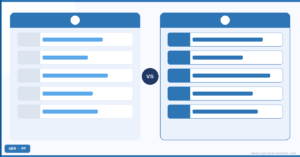
Zoho CRM has five types of automation. Most businesses set up workflow rules and stop there. The teams who get the most from the CRM understand all five, know which solves which problem, and build an automation strategy that covers the entire sales process. This guide explains the five, covers Zoho’s built-in AI layer, and gives a decision framework. It is part of our Zoho CRM guide, with workflow rules and Blueprint and cadences and sequences as its two topics.
The Five Types of Zoho CRM Automation
| Type | How it runs | Use it for |
|---|
| Workflow rules | Fire on record events and conditions; actions include emails, field updates, tasks, webhooks and functions | Most day-to-day automation; the right starting point |
| Blueprint | Enforces a stage-by-stage process; users must complete steps to advance | Processes where skipping steps is costly |
| Cadences | Multi-step outreach sequences that respond to engagement and pause on reply | Structured follow-up between marketing automation and manual outreach |
| Scheduled functions | Deluge scripts on a clock: nightly, weekly, monthly | Clean-ups, roll-ups, rebalancing and anything time-based |
| Approval processes | A designated approver signs off before a record advances | Discounts, non-standard terms, manager review |
Workflow Rules
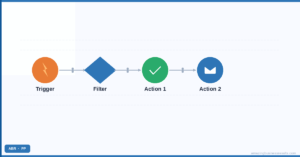
Workflow rules trigger actions when a record meets conditions: a deal created, a field changed, a deal sitting in a stage for more than five days. They are event-driven, condition-based and need no scripting, which makes them the right first tool. The workflow rules guide walks through setup, and the sales process automation guide shows them in practice.
Blueprint
Blueprint enforces a defined process. Unlike workflow rules, which run on their own, Blueprint requires users to take specific actions before a record can move: information to collect, tasks to complete, approvals to get, time limits to meet. It is the tool when consistency across a team matters. See how to build process-driven sales flows and Blueprint explained.
Cadences
A cadence might send an email on day one, create a call task on day three, follow up on day seven and remind about a LinkedIn connection on day ten, adapting to opens and replies and pausing when the lead responds. See the cadences guide and the lead nurturing guide.
Scheduled Functions and Approvals
Scheduled functions run Deluge on a schedule rather than on events: nightly data clean-ups, weekly pipeline roll-ups, monthly territory rebalancing; see scheduled functions. Approval processes add single or multi-level sign-off with reminders and escalation, most often for large discounts and non-standard contract terms.
Zia: The AI Layer
- Lead and deal scoring from activity patterns, so reps work the records most likely to convert.
- Anomaly detection: deals stuck too long, unusual drop-off, sudden velocity changes.
- Email sentiment on incoming messages, for prioritising replies.
- Revenue forecasting from pipeline, history and activity.
- Best time to contact, from past opens and pick-ups.
Zia is available on Professional, Enterprise and Ultimate.
| You want to | Use |
|---|
| Update a field when a condition is met | Workflow rule |
| Enforce a process step by step | Blueprint |
| Run a multi-day outreach sequence that reacts to engagement | Cadence |
| Run a task daily, weekly or monthly | Scheduled function |
| Require a manager’s sign-off before a deal advances | Approval process |
| Score and prioritise leads automatically | Zia |
Availability by Edition
| Edition | Automation available |
|---|
| Standard | Workflow rules, basic |
| Professional | Workflow rules, Blueprint, Zia scoring, validation rules |
| Enterprise | All five types, advanced Zia, sandbox |
| Ultimate | Enterprise plus the highest limits and Analytics |
Pricing checked October 2026. These are Zoho’s published rates at the time of writing. They change over time, vary by region and currency, and may differ inside Zoho One, so confirm the current figures on the official pricing page linked above before you decide.
Why Most Businesses Only Use Workflow Rules
Blueprint, cadences and scheduled functions take more setup upfront, and many teams never get there. The businesses that deploy all five consistently report less manual follow-up, better pipeline visibility and faster deal cycles, with the configuration cost recovered within a quarter. ABR runs standalone automation audits for existing Zoho CRM users to find gaps, duplicate triggers and misconfigured conditions before anything new is added; the Zoho Platform Assessment is the starting point.
Common Mistakes
- A workflow rule where a Blueprint is needed, so steps get skipped.
- Cadences for newsletters that belong in Zoho Campaigns.
- Ten workflow rules firing on the same event with no owner.
- Automation built before the data model is right.
Questions People Ask About Advanced Automation & AI
Short answers, drawn from the guide above.
What are the five types of automation in Zoho CRM?
Workflow rules, Blueprint, cadences, scheduled functions and approval processes, each suited to a different problem.
What is the difference between a workflow rule and a Blueprint?
Workflow rules run automatically when conditions are met. Blueprint makes users complete defined steps before a record can advance, which enforces process.
What is Zia?
Zoho CRM's AI layer: lead and deal scoring, anomaly detection, email sentiment, forecasting and best-time-to-contact suggestions, on Professional and above.
Do scheduled functions need a developer?
They need Deluge scripting; ABR typically builds them during implementation.
When should I use a cadence?
For multi-step sales follow-up that should pause when the lead replies; newsletters and nurture campaigns belong in Zoho Campaigns or Marketing Automation.
Does ABR audit existing automation?
Yes. Automation audits find gaps and duplicate triggers before adding anything, usually through the Zoho Platform Assessment.
{"@context":"https://schema.org","@type":"FAQPage","mainEntity":[{"@type":"Question","name":"What are the five types of automation in Zoho CRM?","acceptedAnswer":{"@type":"Answer","text":"Workflow rules, Blueprint, cadences, scheduled functions and approval processes, each suited to a different problem."}},{"@type":"Question","name":"What is the difference between a workflow rule and a Blueprint?","acceptedAnswer":{"@type":"Answer","text":"Workflow rules run automatically when conditions are met. Blueprint makes users complete defined steps before a record can advance, which enforces process."}},{"@type":"Question","name":"What is Zia?","acceptedAnswer":{"@type":"Answer","text":"Zoho CRM's AI layer: lead and deal scoring, anomaly detection, email sentiment, forecasting and best-time-to-contact suggestions, on Professional and above."}},{"@type":"Question","name":"Do scheduled functions need a developer?","acceptedAnswer":{"@type":"Answer","text":"They need Deluge scripting; ABR typically builds them during implementation."}},{"@type":"Question","name":"When should I use a cadence?","acceptedAnswer":{"@type":"Answer","text":"For multi-step sales follow-up that should pause when the lead replies; newsletters and nurture campaigns belong in Zoho Campaigns or Marketing Automation."}},{"@type":"Question","name":"Does ABR audit existing automation?","acceptedAnswer":{"@type":"Answer","text":"Yes. Automation audits find gaps and duplicate triggers before adding anything, usually through the Zoho Platform Assessment."}}]}