After the Assessment: CRM Police
An assessment tells you where your system stands today. CRM Police keeps it that way.
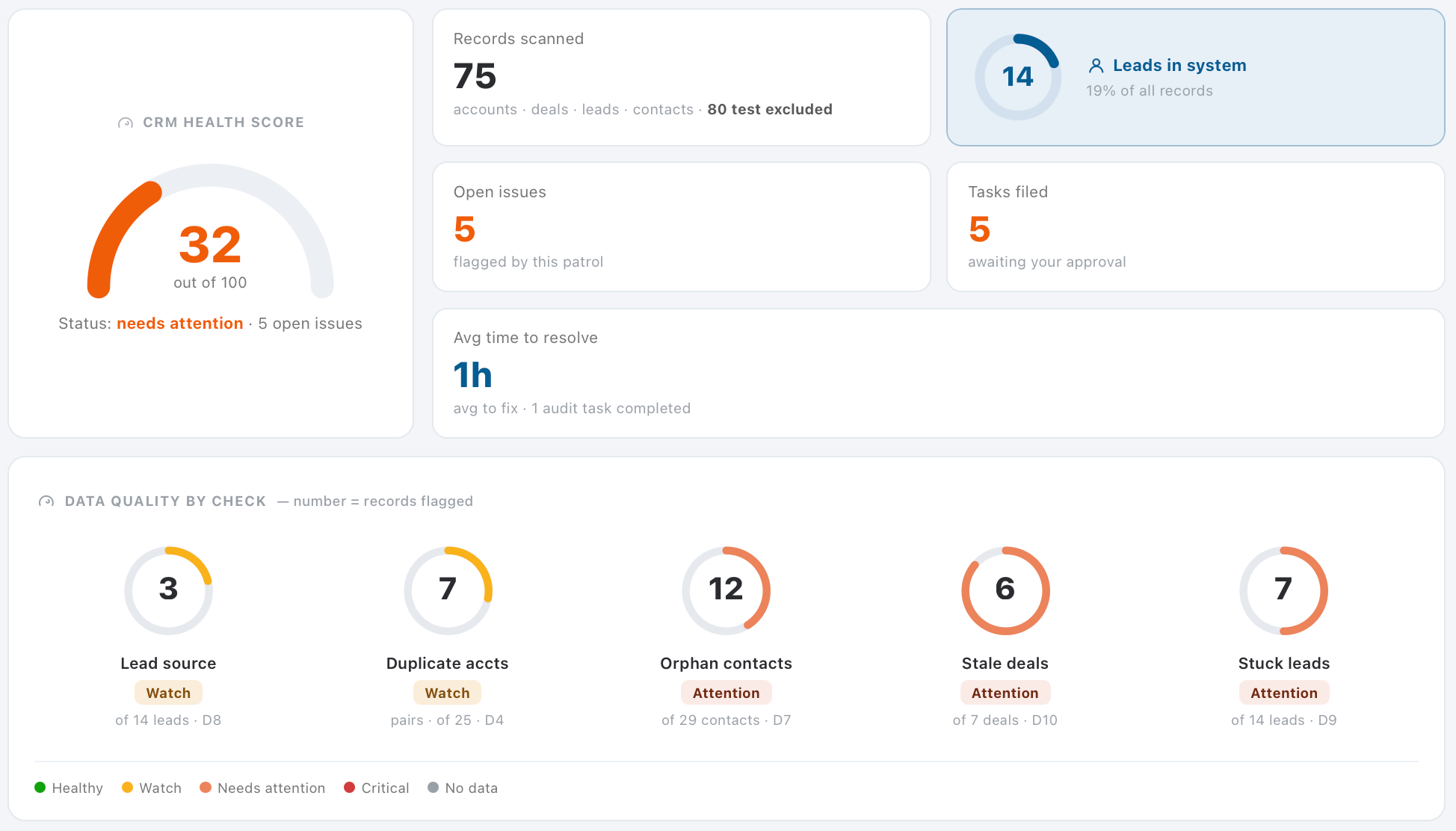
Most Zoho systems do not break in one day. They drift. A salesperson stops filling in the lead source. Two accounts get created for the same company. A deal sits untouched for six weeks and nobody notices until the quarter closes. CRM Police is our ongoing monitoring service that patrols your CRM on a schedule, scores its health out of 100, and flags the records that need a human decision.
- Every patrol scans your accounts, deals, leads and contacts and reports what it found.
- Each check (duplicates, orphan contacts, missing lead sources, stale deals, stuck leads) gets its own rating so you can see where the problem is, not just that there is one.
- Fixes are filed as tasks for your approval. Nothing changes in your system until you say so.
- You see how long issues take to resolve, so the system gets measurably better month over month.
Many clients start with the assessment, fix the critical items, and move to CRM Police so the same problems do not come back.
What a Neglected Zoho System Is Costing You
Most businesses do not have one big problem. They have a handful of quiet ones that add up every month.
Follow-ups that never happen
A workflow fails silently, and a hot lead waits a week. You find out when they have already signed with someone else. This is the task graveyard problem.
Emails that land in spam
If your domain is not authenticated for every Zoho app, your reps think they are reaching customers. They are not.
A pipeline nobody trusts
Stale stages and blank fields mean your forecast is a guess, and hiring and cash decisions are made on it. This is the fake pipeline problem in full.
Data walking out the door
Ex-employees with active logins, and standard users who can export your whole database.
Paying for features you do not use
Zia AI, Blueprints and whole Zoho One apps sit untouched while you pay for them every month.
A team working around the system
Spreadsheets on the side mean double entry, missing history, and a CRM that slowly dies.
A Review, Not a Sales Pitch
The worry we hear most: "Won't you just find a reason to sell us a rebuild?" This is how we work instead.
Honest answers
Sometimes it is "your setup is solid, fix these three things." Sometimes it is "this needs a rebuild." Either way, you will hear it straight.
The roadmap is yours
Findings are written so your own team, ABR or any other partner can act on them. You are never locked in.
Nothing changes without you
We document and recommend. Nothing in your system is touched during the assessment without your approval.
★★★★★
"She helped us think through what should be built now, what should be saved for a future phase."Bryan Dillman · Google review
What We Review, and Why It Matters to Your Business
When the foundations of your Zoho system are right, everything built on top of them (automation, reporting, email and integrations) behaves predictably. We work through it in a deliberate order, because each layer depends on the one before it.
1. Company details and organisation setup
The settings that apply to every user and every record. Errors here affect everyone, and they are the most common cause of problems that look unrelated.
| What we review | Why it matters to your business |
|---|---|
| Core company information | It flows into templates, client-facing documents and reports. Outdated details mean your system represents you inconsistently to customers. |
| Organization time zone | It drives every date and time. If it is wrong, reminders and scheduled automation fire at the wrong hour and reporting periods do not line up. |
| Business hours | Response-time tracking, service levels and escalations all use them. Left on the default, alerts can fire in the middle of the night. |
| Territory and reporting structure | This decides who sees which records. When it mirrors your real org chart, records reach the right owner and managers see their team's work. |
2. User setup
| What we review | Why it matters to your business |
|---|---|
| Every user record: identity, contact details, email signature, position and access level | Incomplete user records cause inconsistent outbound email, work assigned to the wrong person, and team reports nobody can trust. |
3. Email configuration and deliverability
Email is where most of a CRM's value is won or lost.
| What we review | Why it matters to your business |
|---|---|
| Deliverability and domain authentication | Without it, email can fail silently or land in spam. The client never replies, and it looks like disinterest rather than a technical fault. |
| Two-way email sync for each user | Client conversations are captured on the right record, not trapped in one person's inbox, so nothing is lost when someone is away or leaves. |
| Other Zoho apps that send email for you | Campaigns, Books, Sign and others each need their own authentication. Setting up the CRM alone does not cover them. |
| Automated and higher-volume sending | Set up wrong, automated and marketing email is throttled or blocked, and you often find out only after a campaign underperforms. |
4. Calendar integration
| What we review | Why it matters to your business |
|---|---|
| Two-way calendar sync for each user | Prevents double-bookings, keeps availability accurate when scheduling with clients, and means your team works in one calendar. |
5. Roles, permissions and access control
Who can see, change and delete what. This protects sensitive data and limits the damage one mistake can cause.
| What we review | Why it matters to your business |
|---|---|
| Permission sets matched to each job | Default permissions usually give people far more access than they need, including the ability to mass-delete or export your data. |
| Reporting hierarchy and data-sharing rules | Managers see their team's work without exposing staff to data outside their responsibility, which also supports data-protection obligations. |
| Active user audit | Confirms everyone with access still works for you, closes a real security gap, and often finds licences you are paying for but not using. |
6. Lead conversion integrity
| What we review | Why it matters to your business |
|---|---|
| Whether everything captured during the sale carries across when a lead becomes a customer | Unmapped information is silently discarded at conversion. Your team loses it or retypes it, and reporting on where business comes from becomes unreliable. |
7. User interface and ease of use
Contacts, Accounts and Deals are where your team spends most of its day. Low adoption is far more often a layout problem than a training problem.
| What we review | Why it matters to your business |
|---|---|
| A field-by-field walkthrough with your team | Only the people using the system daily know which fields they rely on. We document which should stay, which should be required and which should go. |
| Section structure for each core module | Puts the most important information at the top, so a record can be read in seconds instead of scrolled through. |
| Business card views | The summary panel your team sees first. The right few fields answer the most common question with no scrolling. |
| Canvas views | We introduce purpose-designed record screens and discuss whether they are worth pursuing for your team. |
8. Backup and recoverability
A backup is only worth what it can restore.
| What we review | Why it matters to your business |
|---|---|
| Scheduled backups running successfully | Your recovery position if data is deleted, overwritten in bulk or corrupted by an integration. A silently failed schedule is the same as no backup. |
| A copy kept outside the platform | An independent copy of your own data is a basic continuity control, and often a requirement for insurance or client audits. |
9. Automation health
Automation fails quietly. No error appears; the work simply does not happen.
| What we review | Why it matters to your business |
|---|---|
| Automation rules for errors and failures | A failed rule means a follow-up never created or a notification never sent, usually discovered after a client has been affected. |
| Custom logic and integrations | Expired connections, usage limits or an upstream change can leave an integration running dead for months. We surface it early. |
| Severity-rated findings, not silent fixes | Anything business-critical is documented and brought to you with a recommendation first. You keep full control of how your system behaves. |
10. Capacity and usage limits
| What we review | Why it matters to your business |
|---|---|
| Integration and system usage against your plan | Hitting a limit stops integrations mid-cycle with no obvious cause. Watching the trend lets you plan instead of react. |
| Data and file storage against your plan | Early warning before storage becomes an unexpected cost or blocks new records, so any upgrade is a planned decision. |
What You Receive
A clear picture of where your system stands today, and a prioritised path forward.
A completed review
Every area above, reviewed in order.
Severity-rated findings
A written summary showing what needs attention now and what can be scheduled.
Recommendations
A fix for each issue, with an indication of the effort involved.
What is already right
Confirmation of what is working, not only what is not.
A review session
We walk your team through the results and agree priorities together.
A review schedule
A recommended interval to keep the system healthy as you grow.
How It Works and What You Get
Free discovery call
We learn how your business runs, which Zoho apps you use, and where things feel broken.
System review
With your permission, certified consultants review your Zoho environment area by area.
Team walkthrough
We sit with the people who use the system daily to see where they struggle and what matters to them.
Platform Health Report
Every finding rated critical, important or scheduled, with a recommended fix and effort estimate for each.
Leadership review session
We walk your team through the results and agree priorities together. You keep the recording.
Your choice of next step
Fix it in-house with the roadmap, have ABR implement it, or move to ongoing support. No obligation.
What Assessments Uncover
Florida Healthcare Provider
After a previous consultant, thousands of patient records had been accidentally deleted and nobody trusted the system. ABR started by auditing the existing CRM, set priorities, and rebuilt the operation on Zoho.
Read the story →18 months, Zia never switched on
One Zoho CRM Enterprise client had been paying for Zia lead scoring, deal predictions and anomaly detection for a year and a half without using any of it. Once configured, lead prioritisation improved straight away, at no extra software cost.
Is This Right for You?
A strong fit if you…
- Have used Zoho CRM or Zoho One for six months or more
- Have 5–200 users and feel you are getting a fraction of the value
- Inherited a setup from a previous partner, employee or DIY build
- Are planning expansion, new departments or AI and want a solid base first
Not the best fit if you…
- Have not started with Zoho yet. Start with Architecture & Implementation Planning.
- Need one specific issue fixed today. Support Packages are faster for that.
Frequently Asked Questions
Will you just try to sell us a rebuild?
No. If your setup is solid, we will say so and list the few things to fix. The roadmap is written so your own team or any other partner can act on it.
Will you change anything in our system?
Not without your approval. The assessment documents findings and recommendations. Any changes are scoped, quoted and approved separately.
How much of our team's time does it take?
Usually a short walkthrough with your key users and a review session with leadership. We do the heavy lifting.
We only use Zoho CRM. Is this still relevant?
Yes. The assessment scales from a single CRM org to a full Zoho One environment.
Is our data safe during the review?
Yes. We work with the access level you approve, and we do not export or change your data as part of the assessment.
How is this different from your AI Readiness Assessment?
The AI Readiness Assessment looks only at where AI can help. This reviews the health of your whole Zoho system, which is often the groundwork AI needs first.
How often should we have an assessment?
At least once a year, and before any major expansion, migration or AI project.
Find out what your Zoho system is hiding
Book a free 30-minute call. We will listen to where things feel stuck and tell you what an assessment would uncover. No obligation.