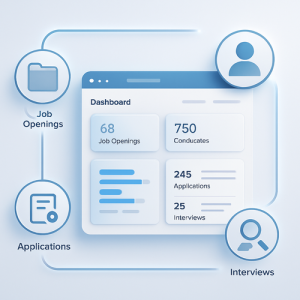
Zoho Recruit is Zoho’s applicant tracking system. In-house HR teams use it to post jobs, collect and screen applications, schedule interviews and make offers; staffing agencies use it to manage clients, job orders, candidates and placements. Everything sits in one pipeline, with automation for routine steps and connections to Zoho People, Zoho CRM and job boards.
This guide covers what Zoho Recruit does, how its two editions differ, what each plan costs and the setup decisions that matter most. It sits in the HR & People Management section of our Zoho One ecosystem guide.
Corporate HR or Staffing Agency Edition?
| Corporate HR edition | Staffing Agency edition |
|---|
| Built for | In-house teams hiring for their own company | Agencies placing candidates with clients |
| Key records | Job openings, candidates, interviews, offers | Clients, contacts, job orders, candidates, placements |
| Paid plans | Standard and Enterprise | Standard, Professional and Enterprise |
| Active jobs | Lower limits per plan (for example 10 on Standard) | Higher limits per plan (for example 100 on Standard) |
Choose the edition that matches your business model first, then the plan by the number of active jobs and features you need.
What Zoho Recruit Does
Job posting and career site
Publish openings to your own career page and to job boards from one place, and share them on social media.
Candidate pipeline
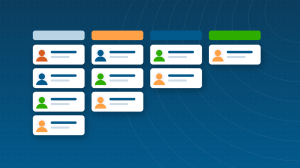
Track every applicant through stages you define, from application to hire, with resume parsing that turns CVs into searchable records on paid plans.
Interviews and assessments
Schedule interviews, collect interviewer feedback and send pre-screening assessments. See our guide to pre-screening assessments in Zoho Recruit.
Automation and Blueprint
Automate emails, stage changes and reminders, and use Blueprint on higher plans to enforce the steps of your hiring process.
Customization
Tailor fields, layouts, related lists, roles and profiles to your process. See custom fields, related lists and roles and profiles in Zoho Recruit.
Portals
Career portals for candidates and, on agency plans, client portals where clients review submitted candidates.
Customizing Recruit for Your Process
Zoho Recruit is highly customizable, and most teams benefit from a few targeted changes: fields for the details you screen on, related lists that show interviews and assessments on each candidate, and roles and profiles that give hiring managers a focused view. Our guides to custom fields, related lists and roles and profiles walk through each.
How Zoho Recruit Connects to Other Apps
- Zoho People: hired candidates move into Zoho People as new employees.
- Zoho CRM: agencies manage client relationships and business development; see Zoho CRM for HR consultants.
- Zoho Mail and calendars: email candidates and schedule interviews from Recruit.
- Zoho Forms and Zoho Campaigns: capture applications and nurture talent pools.
Zoho Recruit Pricing
| Plan | Corporate HR (per recruiter, per month, annual) | Staffing Agency (per recruiter, per month, annual) |
|---|
| Free | $0 (1 recruiter, 1 active job) | $0 (1 recruiter, 1 active job) |
| Standard | $25 | $25 |
| Professional | Not offered | $50 |
| Enterprise | $50 | $75 |
Monthly billing costs about 20% more, active job limits differ by edition and plan, and add-ons such as video interviews cost extra. Zoho Recruit is included in Zoho One. Check the current Zoho Recruit pricing page for your edition.
A Typical Hiring Flow in Zoho Recruit
- The hiring manager requests a role, and HR creates the job opening.
- The job is published to the career page and job boards.
- Applications arrive, resumes are parsed and candidates enter the pipeline.
- Pre-screening assessments filter early, and interviews are scheduled with feedback collected.
- An offer is sent, and once accepted the new hire moves to Zoho People for onboarding.
For Staffing Agencies
The Staffing Agency edition adds clients, contacts, job orders and placements, client portals for reviewing submissions and higher active job limits. Agencies often pair Recruit with Zoho CRM for business development and client relationships, so the sales and delivery sides of the agency share the same client data.
Who Gets the Most Value from Zoho Recruit
- Growing companies hiring regularly that have outgrown email and spreadsheets.
- Staffing and recruitment agencies managing clients, job orders and placements.
- HR teams that want hiring connected to Zoho People and onboarding.
- Businesses on Zoho One that want an ATS without another subscription.
Which Plan Fits?
| Situation | Suggested plan | Why |
|---|
| Occasional hiring, one role at a time | Free | One recruiter and one active job |
| In-house team with a handful of open roles | Corporate HR Standard | Core ATS with resume parsing |
| In-house team with many roles or complex approvals | Corporate HR Enterprise | Higher job limits and advanced automation |
| Small or mid-sized agency | Staffing Agency Standard or Professional | Client and placement management with higher job limits |
| Large agency | Staffing Agency Enterprise | Highest limits and advanced features |
Talent Pools and Re-Engagement
Candidates who were not hired are valuable for future roles. Tag strong candidates by skill and location, keep them in talent pools and contact them when a matching role opens. Connected to Zoho Campaigns, you can send occasional updates about new openings so your pipeline is never empty.
Setting Up Zoho Recruit: The Decisions That Matter Most
- Choose the right edition for your business model before importing anything.
- Define hiring stages to match how you really interview and decide.
- Customize fields and layouts for the information you need, and no more.
- Set roles and profiles so recruiters, hiring managers and interviewers see the right records.
- Connect job boards and your career page.
- Build two or three automations, such as acknowledgement emails and interview reminders.
- Time to fill per role and per stage.
- Source of hire, to see which job boards and referrals work best.
- Pipeline conversion from application to interview to offer.
- Offer acceptance rate.
Common Zoho Recruit Mistakes
- Choosing the Corporate HR Standard plan and hitting the active job limit quickly.
- Too many pipeline stages, so candidates sit in unclear statuses.
- Hiring managers given full access instead of a focused profile.
- Not connecting Recruit to Zoho People, so new hires are retyped.
Zoho Recruit Guides
Questions People Ask About Zoho Recruit
Short answers, drawn from the guide above.
What is Zoho Recruit used for?
Zoho Recruit is an applicant tracking system used by in-house HR teams and staffing agencies to post jobs, manage candidates, schedule interviews, run assessments and track hires or placements.
Is Zoho Recruit free?
Zoho Recruit has a free plan for one recruiter with one active job. Paid plans start at $25 per recruiter per month billed annually.
What is the difference between Zoho Recruit's editions?
The Corporate HR edition is for in-house hiring and offers Standard and Enterprise plans. The Staffing Agency edition adds client and placement management, a Professional plan and higher active job limits.
Does Zoho Recruit integrate with Zoho People?
Yes. Candidates hired in Zoho Recruit can move into Zoho People as new employees, so their details are not entered twice.
Is Zoho Recruit included in Zoho One?
Yes. Zoho Recruit is one of the apps included in a Zoho One subscription.
Can Zoho Recruit post jobs to job boards?
Yes. Zoho Recruit can publish openings to your career page and to multiple job boards from one place, with integration options depending on your region and plan.
Which Zoho Recruit edition should I choose?
Choose Corporate HR if you hire for your own company, and Staffing Agency if you place candidates with clients. Then pick the plan by active jobs and features needed.
Does Zoho Recruit parse resumes?
Yes. Paid plans include resume parsing, which turns uploaded CVs into structured, searchable candidate records. The free plan does not include parsing.
Can hiring managers use Zoho Recruit?
Yes. Give hiring managers a focused profile so they can review candidates, leave interview feedback and approve offers without seeing settings or unrelated records.
{"@context":"https://schema.org","@type":"FAQPage","mainEntity":[{"@type":"Question","name":"What is Zoho Recruit used for?","acceptedAnswer":{"@type":"Answer","text":"Zoho Recruit is an applicant tracking system used by in-house HR teams and staffing agencies to post jobs, manage candidates, schedule interviews, run assessments and track hires or placements."}},{"@type":"Question","name":"Is Zoho Recruit free?","acceptedAnswer":{"@type":"Answer","text":"Zoho Recruit has a free plan for one recruiter with one active job. Paid plans start at $25 per recruiter per month billed annually."}},{"@type":"Question","name":"What is the difference between Zoho Recruit's editions?","acceptedAnswer":{"@type":"Answer","text":"The Corporate HR edition is for in-house hiring and offers Standard and Enterprise plans. The Staffing Agency edition adds client and placement management, a Professional plan and higher active job limits."}},{"@type":"Question","name":"Does Zoho Recruit integrate with Zoho People?","acceptedAnswer":{"@type":"Answer","text":"Yes. Candidates hired in Zoho Recruit can move into Zoho People as new employees, so their details are not entered twice."}},{"@type":"Question","name":"Is Zoho Recruit included in Zoho One?","acceptedAnswer":{"@type":"Answer","text":"Yes. Zoho Recruit is one of the apps included in a Zoho One subscription."}},{"@type":"Question","name":"Can Zoho Recruit post jobs to job boards?","acceptedAnswer":{"@type":"Answer","text":"Yes. Zoho Recruit can publish openings to your career page and to multiple job boards from one place, with integration options depending on your region and plan."}},{"@type":"Question","name":"Which Zoho Recruit edition should I choose?","acceptedAnswer":{"@type":"Answer","text":"Choose Corporate HR if you hire for your own company, and Staffing Agency if you place candidates with clients. Then pick the plan by active jobs and features needed."}},{"@type":"Question","name":"Does Zoho Recruit parse resumes?","acceptedAnswer":{"@type":"Answer","text":"Yes. Paid plans include resume parsing, which turns uploaded CVs into structured, searchable candidate records. The free plan does not include parsing."}},{"@type":"Question","name":"Can hiring managers use Zoho Recruit?","acceptedAnswer":{"@type":"Answer","text":"Yes. Give hiring managers a focused profile so they can review candidates, leave interview feedback and approve offers without seeing settings or unrelated records."}}]}