Most businesses install Zoho CRM and only scratch the surface. The real value is in how you customise, automate and optimise it for your own sales process, because the configuration that ships out of the box was designed for an average business, not yours. This guide covers every layer of Zoho CRM configuration, which is what ABR specialises in. The guides are organised here by area: custom modules, multi-step automation, compliance and first-time setup. For selling with Zoho CRM, from leads to forecasting, see the Zoho CRM Sales Hub. For Zoho CRM’s place in the wider suite, see our Zoho One Ecosystem guide.
Why Configuration Decides Whether Your Team Uses It
The most consistent factor in failed CRM implementations is the mismatch between the tool’s default setup and how the business actually works. Generic modules, generic field labels and generic pipeline stages are not how a sales team thinks about its deals. When the CRM does not reflect the real process, people work around it instead of inside it: usage drops, pipeline data becomes unreliable, and management loses the visibility the CRM was meant to provide. The software gets blamed; the real issue is configuration. For the patterns behind this, see the top ten reasons CRM projects fail.
The Four Areas of Zoho CRM Configuration
| Area | What it covers | Start here |
|---|
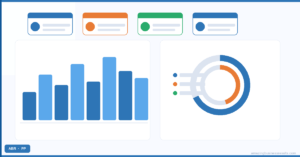
| Data Architecture & UX | Custom modules and fields, page layouts, Canvas Builder views, reports and dashboards | Data architecture guides |
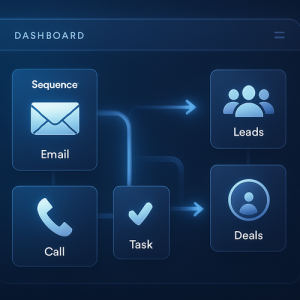
| Advanced Automation & AI | Workflow rules, Blueprint, cadences, scheduled functions, approval processes and Zia | Automation guides |
| Setup & Getting Started | First login to a working system: modules, email, users, mobile, lead management | Getting started guides |
| Security & Compliance | Roles and profiles, record locking, audit logs, encryption, IP restrictions, GDPR | Security guides |
Zoho CRM Pricing at a Glance
| Edition | Fit |
|---|
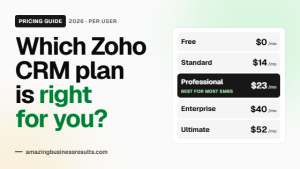
| Free (3 users) | Solo operators and very small teams testing the basics |
| Standard | Small teams with one pipeline and simple automation |
| Professional | Blueprint, inventory, Zia scoring and validation rules |
| Enterprise | Custom modules at scale, Canvas Builder, sandbox, advanced AI |
| Ultimate | Enterprise plus Zoho Analytics and the highest limits |
Per-user prices and plan contents change, so see our Zoho CRM pricing guide for 2026 for current figures and the plan most SMBs should choose, and the official pricing page for your region. Zoho CRM is included in Zoho One.
Pricing checked October 2026. These are Zoho’s published rates at the time of writing. They change over time, vary by region and currency, and may differ inside Zoho One, so confirm the current figures on the official pricing page linked above before you decide.
Zoho CRM Services From ABR
ABR provides the full range of Zoho CRM services for SMBs across North America and the UK. Every engagement starts with understanding your sales process, not with a feature walkthrough.
| Service | Who it is for |
|---|
| Implementation from scratch | Businesses setting up CRM for the first time or moving off spreadsheets: data structure, modules, pipeline, email, training |
| Customisation | Teams that have Zoho CRM but avoid it because the configuration does not match how they work |
| Automation build | Workflow rules, Blueprint, cadences and approvals, after an audit of what already exists |
| Migration | Moving from Salesforce, HubSpot, Pipedrive or spreadsheets with mapping, validation and a parallel run |
| Training | Admins, sales teams and managers, each on what they use daily |
- A professional services firm cut deal cycle time by 40 percent after Blueprint removed manual stage transitions and follow-up tasks from the sales team’s day.
- A real estate agency assigns leads automatically within five minutes of a form submission, with 14-day follow-up sequences running without manual input.
- A healthcare practice built a GDPR-compliant patient CRM with custom modules, role-based access and field-level encryption, and passed its compliance audit with no findings.
See the full collection of ABR client case studies for results across industries.
Is Zoho CRM the Right Choice?
For SMBs comparing CRM options, Zoho CRM’s advantage is depth of customisation at a price that stays sane as the team grows, and native connection to the rest of Zoho One. Its weaknesses are a steeper configuration curve than HubSpot’s starter tiers and a smaller third-party ecosystem than Salesforce. Our honest assessment for small businesses and the Zoho CRM versus Salesforce comparison go into detail.
Common Mistakes With Zoho CRM
- Using the default modules and stages for a business that does not sell that way.
- Automating with workflow rules only, when Blueprint or cadences fit the problem.
- Importing messy data and configuring around it.
- Buying Enterprise for features nobody is trained to use.
- Skipping roles and profiles, so everyone sees and edits everything.
Questions People Ask About Zoho CRM
Short answers, drawn from the guide above.
What is Zoho CRM?
Zoho CRM is Zoho's customer relationship management system for leads, contacts, accounts, deals, activities, automation and reporting, and the sales core of Zoho One.
How much does Zoho CRM cost?
There is a free edition for up to three users. Paid editions, Standard, Professional, Enterprise and Ultimate, are priced per user per month and billed annually or monthly; see our pricing guide for current figures. Zoho CRM is included in Zoho One.
What are the main ways to customise Zoho CRM?
Custom modules and fields, page layouts, Canvas Builder record views, reports and dashboards, and the five automation types: workflow rules, Blueprint, cadences, scheduled functions and approval processes.
Which edition do most small businesses need?
Professional covers most sales teams; Enterprise is the step up when custom modules at scale, Canvas Builder or a sandbox matter.
Does ABR implement Zoho CRM?
Yes. ABR is a Zoho Premium Partner with 2,000+ projects, offering implementation, customisation, automation, migration and training.
Is Zoho CRM better than HubSpot or Salesforce?
It depends on the business: Zoho wins on customisation depth and price, HubSpot on ease at the entry level, Salesforce on enterprise ecosystem. Our comparison guides cover each.
{"@context":"https://schema.org","@type":"FAQPage","mainEntity":[{"@type":"Question","name":"What is Zoho CRM?","acceptedAnswer":{"@type":"Answer","text":"Zoho CRM is Zoho's customer relationship management system for leads, contacts, accounts, deals, activities, automation and reporting, and the sales core of Zoho One."}},{"@type":"Question","name":"How much does Zoho CRM cost?","acceptedAnswer":{"@type":"Answer","text":"There is a free edition for up to three users. Paid editions, Standard, Professional, Enterprise and Ultimate, are priced per user per month and billed annually or monthly; see our pricing guide for current figures. Zoho CRM is included in Zoho One."}},{"@type":"Question","name":"What are the main ways to customise Zoho CRM?","acceptedAnswer":{"@type":"Answer","text":"Custom modules and fields, page layouts, Canvas Builder record views, reports and dashboards, and the five automation types: workflow rules, Blueprint, cadences, scheduled functions and approval processes."}},{"@type":"Question","name":"Which edition do most small businesses need?","acceptedAnswer":{"@type":"Answer","text":"Professional covers most sales teams; Enterprise is the step up when custom modules at scale, Canvas Builder or a sandbox matter."}},{"@type":"Question","name":"Does ABR implement Zoho CRM?","acceptedAnswer":{"@type":"Answer","text":"Yes. ABR is a Zoho Premium Partner with 2,000+ projects, offering implementation, customisation, automation, migration and training."}},{"@type":"Question","name":"Is Zoho CRM better than HubSpot or Salesforce?","acceptedAnswer":{"@type":"Answer","text":"It depends on the business: Zoho wins on customisation depth and price, HubSpot on ease at the entry level, Salesforce on enterprise ecosystem. Our comparison guides cover each."}}]}