A CRM without reporting is a contact database. Zoho CRM’s reports and dashboards turn pipeline data into the management intelligence a business runs on: which deals are at risk, which reps are outperforming, which lead sources generate revenue and which stages cause drop-off. This guide brings the reporting content together, for a first dashboard or for tightening an existing one for management visibility. It sits in the Data Architecture & UX section of our Zoho CRM guide.
The Four Types of Zoho CRM Reports
| Report type | What it shows | Best for |
|---|
| Tabular | A flat list of records with selected fields | Contact exports, activity logs, deal lists |
| Summary | Records grouped by a field with subtotals | Revenue by rep, deals by stage, leads by source |
| Matrix | Two-dimensional grouping, rows and columns | Rep performance by month, value by stage and territory |
| Joined | Data from several modules in one report | Deals with their contact and account data |
The Reports Every Sales Team Should Have
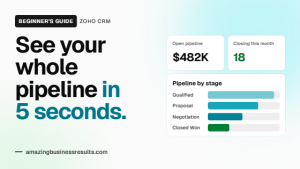
- Open pipeline by stage: a summary report with deal count and value per stage, the primary pipeline health view.
- Activities by rep this week: calls, tasks and meetings grouped by owner; low activity now means a thin pipeline in three to four weeks.
- Deals closing this month: a tabular report filtered on close date, sorted by value, the revenue accountability list.
- Lead source conversion rate: a matrix or summary report showing leads per source, conversions and close rate, which decides marketing spend.
Dashboards That Get Checked Daily
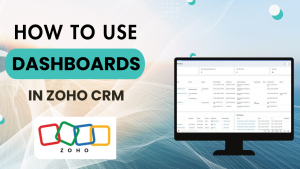
Dashboards get ignored when they show data nobody can act on: historical metrics with no link to today’s decisions, or numbers so high-level they tell management nothing new. Effective dashboards combine three component types: summary numbers (open pipeline value, deals closing this month, activity this week), trend charts (pipeline over 12 weeks, close rate by month) and action lists (deals with no activity in 14 days, overdue tasks by rep). The beginner’s guide to reports and dashboards covers the full build, widget by widget, including how to set a dashboard as the team’s home screen.
Zia Forecasting and Anomaly Detection
Zia adds predictive reporting on top of the standard engine: revenue forecasts from pipeline data and historical close rates, anomaly detection that flags deals stuck too long or sudden changes in velocity, and deal scoring that ranks which open deals deserve attention now. Zia is available on Professional and above. See the automation and AI guide for the full Zia capability list.
When to Move to Zoho Analytics
| Stay with CRM reports when | Move to Zoho Analytics when |
|---|
| Questions are about CRM data alone | Reports must join CRM with Books, Desk or Projects |
| Standard groupings answer them | You need custom calculated metrics and conditional formatting |
| A handful of users read them | Executive dashboards go to many people on schedules |
| Volume is modest | Data is in the millions of rows |
Zoho Analytics is included in the Ultimate edition and available as an add-on to Professional and Enterprise; see our Zoho Analytics guide and the pricing guide.
Pricing checked October 2026. These are Zoho’s published rates at the time of writing. They change over time, vary by region and currency, and may differ inside Zoho One, so confirm the current figures on the official pricing page linked above before you decide.
Reporting Habits That Keep Data Honest
- Required fields on stage changes, so reports are not built on blanks.
- One owner per report; shared reports drift.
- Dashboards reviewed in the Monday meeting, which is what makes reps keep data current.
- A quarterly clean-up of reports nobody opened.
Common Mistakes
- Thirty reports and no baseline four.
- Dashboards of history with no action list.
- Reporting on data entered weekly from memory.
- Exporting to spreadsheets to answer questions the CRM can answer.
Questions People Ask About Reports & Dashboards
Short answers, drawn from the guide above.
What types of reports does Zoho CRM have?
Tabular, summary, matrix and joined reports, built with a drag-and-drop report builder and filters.
Which reports should every sales team have?
Open pipeline by stage, activities by rep this week, deals closing this month and lead source conversion rate.
Can Zoho CRM forecast revenue?
Yes. Zia forecasting, on Professional and above, projects revenue from pipeline data and historical close rates, and flags anomalies.
When do I need Zoho Analytics?
When reports must join several Zoho apps, need custom metrics and formatting, go to many users on schedules, or cover very large data.
Can dashboards be shared with the team?
Yes. Dashboards are shared by role or user and can be set as the default home screen.
Why do dashboards get ignored?
Usually because they show history without action lists. Add a list of deals with no activity and overdue tasks, and reviews happen.
{"@context":"https://schema.org","@type":"FAQPage","mainEntity":[{"@type":"Question","name":"What types of reports does Zoho CRM have?","acceptedAnswer":{"@type":"Answer","text":"Tabular, summary, matrix and joined reports, built with a drag-and-drop report builder and filters."}},{"@type":"Question","name":"Which reports should every sales team have?","acceptedAnswer":{"@type":"Answer","text":"Open pipeline by stage, activities by rep this week, deals closing this month and lead source conversion rate."}},{"@type":"Question","name":"Can Zoho CRM forecast revenue?","acceptedAnswer":{"@type":"Answer","text":"Yes. Zia forecasting, on Professional and above, projects revenue from pipeline data and historical close rates, and flags anomalies."}},{"@type":"Question","name":"When do I need Zoho Analytics?","acceptedAnswer":{"@type":"Answer","text":"When reports must join several Zoho apps, need custom metrics and formatting, go to many users on schedules, or cover very large data."}},{"@type":"Question","name":"Can dashboards be shared with the team?","acceptedAnswer":{"@type":"Answer","text":"Yes. Dashboards are shared by role or user and can be set as the default home screen."}},{"@type":"Question","name":"Why do dashboards get ignored?","acceptedAnswer":{"@type":"Answer","text":"Usually because they show history without action lists. Add a list of deals with no activity and overdue tasks, and reviews happen."}}]}