Zoho CRM Email Extensions: Deliverability, Tracking and Configuration
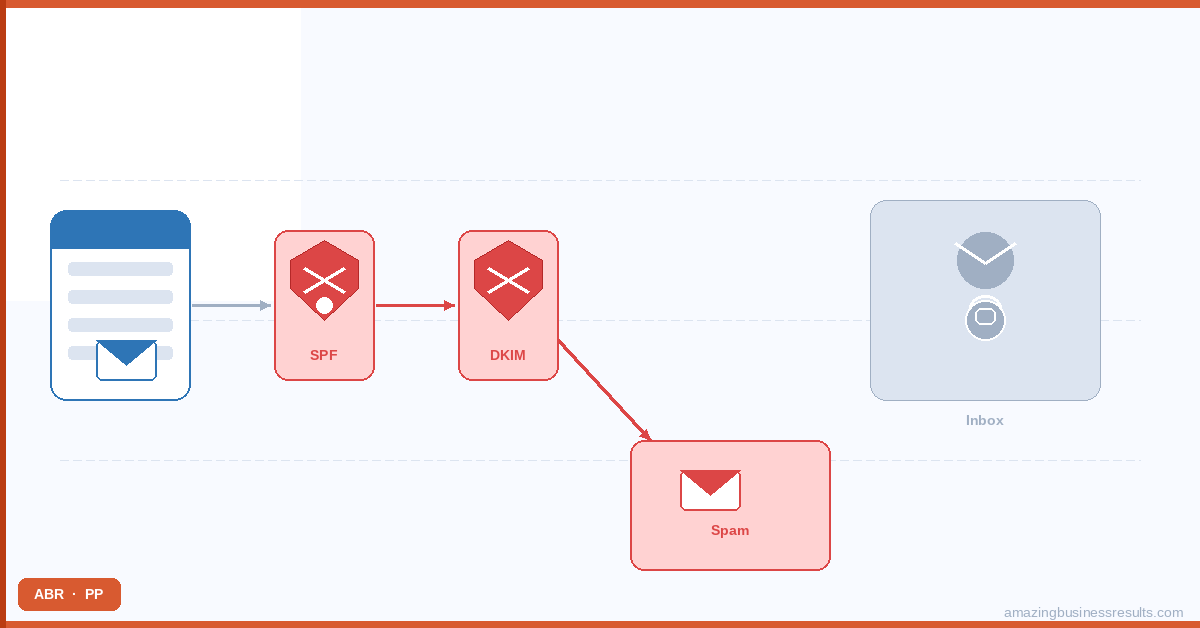
The Email Deliverability Problem in Zoho CRM
Zoho CRM sends email from your connected email account — Gmail, Microsoft 365, Zoho Mail or a configured SMTP server. The deliverability of those emails depends on factors that have nothing to do with Zoho CRM itself: your domain’s sender reputation, DNS authentication records, historical bounce rates and whether your sending patterns match what spam filters expect from a legitimate business.
The four most common causes of Zoho CRM emails going to spam:
- Missing or incorrect SPF records: SPF (Sender Policy Framework) is a DNS record that tells receiving mail servers which IP addresses are authorised to send email from your domain. If your Zoho CRM email server is not listed in your SPF record, receiving servers treat the email as potentially spoofed.
- Missing DKIM signature: DKIM (DomainKeys Identified Mail) cryptographically signs outgoing emails to verify they have not been tampered with in transit. Most spam filters give higher trust to DKIM-signed messages.
- Sending to stale or bounced addresses: repeatedly sending to email addresses that bounce or have been abandoned damages your domain’s sender reputation. High bounce rates are a strong spam signal.
- Email volume spikes: sending 500 emails from a domain that typically sends 20 a day triggers spam filters. Gradual volume ramping is required when scaling CRM email volume.
For the complete diagnosis and fix guide, see the Zoho CRM emails going to spam — causes and fixes.
ABR**'**s Email Deliverability Extension
The ABR Email Deliverability Extension monitors your Zoho CRM email sending health on an ongoing basis — surfacing problems before they compound into serious reputation damage rather than after your deliverability has already deteriorated.
Key capabilities: sender reputation monitoring (checks your domain’s score against major reputation databases), bounce management (automatically removes or suppresses hard-bounced addresses from future sends), domain authentication verification (confirms SPF, DKIM and DMARC records are correctly configured for your sending domain), and deliverability alerting (notifications when reputation scores drop below thresholds or bounce rates exceed safe limits).
ABR Email Deliverability Extension: Full Features, Setup and Pricing
Email Extension and Configuration Guides
| Guide | URL | What It Covers |
|---|---|---|
| ABR Email Deliverability Extension | /abr-email-deliverability-extension/ | Full product guide: features, setup, pricing and before/after deliverability comparison |
| Why Zoho CRM Emails Go to Spam | /zoho-crm-emails-going-to-spam/ | Diagnosis guide: SPF, DKIM, DMARC, bounce management, sending patterns |
| Configuring Email in Zoho CRM | /zoho-crm-email-configuration/ | Complete email setup guide: SMTP, Gmail, Outlook, Zoho Mail |
| Zoho CRM Email Open Tracking | /zoho-crm-email-tracking/ | How to track email opens and clicks from Zoho CRM records |
| Smarter Emails with AI in Zoho CRM | /smarter-emails-with-ai-inside-zoho-crm/ | Using Zoho CRM AI tools to improve email writing and personalisation |
Email Deliverability Checklist
If your Zoho CRM emails are experiencing deliverability problems, work through this checklist in order:
- Check your SPF record: use a free SPF checker tool (MXToolbox is widely used) to verify your domain’s SPF record includes Zoho’s sending servers. If Zoho’s mail server IP ranges are not in your SPF record, add them.
- Check your DKIM configuration: in Zoho CRM Settings Email Email Configuration verify DKIM signing is enabled for your sending domain. If not, follow Zoho’s DKIM setup guide for your DNS provider.
- Check DMARC: DMARC (Domain-based Message Authentication, Reporting and Conformance) builds on SPF and DKIM to tell receiving servers what to do when authentication fails. A DMARC record in policy=none mode at minimum is now expected by major mail providers (Gmail, Outlook).
- Review your bounce rate: in Zoho CRM, run a report on email activities filtered by status “Bounced.” If bounce rate exceeds 2% of sent volume, suppress all bounced addresses before your next send.
- Check your domain reputation: use Google Postmaster Tools (for Gmail delivery) and Microsoft SNDS (for Outlook delivery) to see how your domain is rated by the two largest mail providers. Red or yellow reputation scores require active remediation.
- If all of the above check out and emails still land in spam: the issue is likely content-related (spam trigger words in subject lines or body), a spam filter misclassification or a reputation problem at the IP level rather than the domain level. The ABR Email Deliverability Extension monitors at the IP level and provides the additional diagnostic data needed to identify IP-level issues.
Back to the full extensions marketplace.
Frequently Asked Questions
What does the ABR Email Deliverability Extension do?
Why do Zoho CRM emails go to spam?
Does Zoho CRM track email opens natively?
Can I send from my own domain in Zoho CRM?
Can ABR help fix our Zoho CRM email deliverability?